Posts

Avoiding Conversation Mode in Outlook

Image
One time ago I'd been using Lotus Notes in the office, but we moved to Outlook , which I consider is much better that the other tool, however I looked into the web version and I found something that for me is very annoying.    When you select a mail you have to display the conversation tree, and when you see it you don't understand very well what this is about (at least I can't), I know that the tree show the conversation flow but I still can't get it.   Fortunately, If you want to get back to the old-style mail you have to click on "Conversations by Date" that is located in the right superior corner and select "Off" under the "Conversations" label.   After doing so you will have your mail as usual.    I think that it's interesting the conversation view of mails but as I don't get used to it, I don't wan to use it.

Resizing Images Without Distortion

Image
I work a lot with PowerPoint and this tool is perfect when you want to make a presentation because it's very useful to put images inside with ease. But many times when you copy an image an paste it in a slide it's not in the ideal size. Then you try to resize the image to get it ready for the presentation, for example, I copy this image, a print screen.     After that this image is pasted in the presentation. If you try to resize this image in PowerPoint you will realize that this application gives you free control about it, so if you are not careful with your movements you can distort the image.   Ok, to avoid this it's better to not have much control of the image so you need to lock the ratio aspect. To reach this just right-click on the image and select "Size and Position...".   And click on "Lock aspect ratio". Once you set that value you will notice that you can resize the image but maintaining...

Creating a Quick Survey with Lync

Image
In these days when we have more ways to communicate each other, an instant messaging application is very useful to get in contact with many persons. In this situation Microsoft Lync helps us to create a group chat, but sometimes we need just a closed answer rather than an open opinion of the participants of this chat. This is the moment when Lync gives us a feature that allows us to create a poll to obtain a simple answer, to do so when you have a group chat get into "Share" option, inside of it click in "New Poll".   A window will appear to complete the title, question and options to show, click on "Create". Immediately the poll will be created and showed to all the participants of the chat, they will be able to respond the poll. You will see in real time how the answers are marked in the poll until you decide the end of it.    In this way you will have the answers of all the participants of the chat about an specific topic.

Obtaining All the Information of Computers

Image
When we buy a computer this one is ready to be used so we don't have to worry about having the network card, mouse or touchpad ready, to mention a few examples. However, what happens if you need or have to format your computer? Well, you can use your Windows disk to make a new installation and get the disk formatted. But you will notice that after this process some of your devices won't work correctly. When this happens it's probably because you don't have the required drivers of your devices. What a problem! how can I fix that? Very simple, I'll introduce you a tool named HWiNFO , install it and execute it with an account with admin privileges, this application allows you to choice the type of report it's going to generate.     After that, you will be in front of a summary of your system, you can review it but for this post just click on "Close".   Once you close the system summary you'll see a window like this, giving you all the...

Getting the Max Value with Condition in Excel

Image
Happy new year my friends!! It's time for the first post of 2014!. As usual, I was working at a floor where working with Excel it's very important, so I was working by myself until a friend that was close to me just asked me something that I couldn't answer at that moment. She needed to get the max value from a huge list in Excel, but this value had to be obtained according to a condition, in this case this was a product. Let's do this with an example, supose that the list is about three products (A, B and C) and the months that they were sold expressed in numbers. Thereby, the task is to know what was the last month each product was sold.    To make it very clear let's start with the condition function, we use "IF" to show that it's required a condition, which is going to be searched on "Product" column from "Data" section and the condition is product "A", if true it's going to return the value associated to ...

Obtaining Computer Name From an IP Address

Image
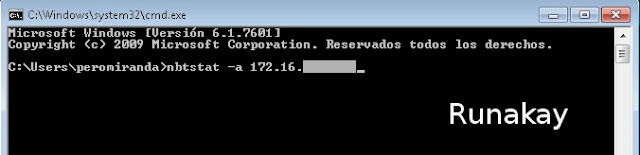
In this world all the computers that are connected to a network have to be identified in some way, hence, the IP (Internet Protocol) address exists and gives each computer a unique identification number by which we can find them. However, when you work with a computer that is in a local network it's always necessary to get connected to it, what is more, sometimes you need to access to it without being physically there. Thanks to god that we have a mechanism to see our machine remotely, and this requires obviously the IP address or the computer name. Yes, a computer name, because remember that the IP address is composed by many numbers that are not easy to remember, even more, sometimes the name of the machine gives you a clue about what kind of computer is, for example, where I work a name beginning with "PE" means that the computer is located at Peru meanwhile starting with "CO" means that it's in Colombia. Perhaps it happened that you only hav...

Making Excel VLOOKUP Function to Work

Image
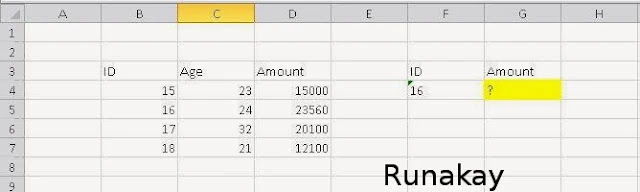
I have seen many times that there are some scenarios where the Excel VLOOKUP function is not able to calculate the value we are looking for. For example, let's search the amount for the ID 16 according to a little table with this value. This is something really easy to do, we need only to use VLOOKUP function selecting the ID, the matrix and the column to be search. However, when you see the result of this function you notice that there's an error despite the values are fine. The reason of this error is that the searched ID value is stored as text, so you can convert it in number in this case because it's only one value, but what if it were a thousand of them?. To avoid worrying about format issues just embraces the key value in the VALUE function inside the VLOOKUP function. Once you use the function you are going to get the value that corresponds to the ID. Consider that this is an example where the...