Posts

Getting the Max Value with Condition in Excel

Image
Happy new year my friends!! It's time for the first post of 2014!. As usual, I was working at a floor where working with Excel it's very important, so I was working by myself until a friend that was close to me just asked me something that I couldn't answer at that moment. She needed to get the max value from a huge list in Excel, but this value had to be obtained according to a condition, in this case this was a product. Let's do this with an example, supose that the list is about three products (A, B and C) and the months that they were sold expressed in numbers. Thereby, the task is to know what was the last month each product was sold.    To make it very clear let's start with the condition function, we use "IF" to show that it's required a condition, which is going to be searched on "Product" column from "Data" section and the condition is product "A", if true it's going to return the value associated to ...

Obtaining Computer Name From an IP Address

Image
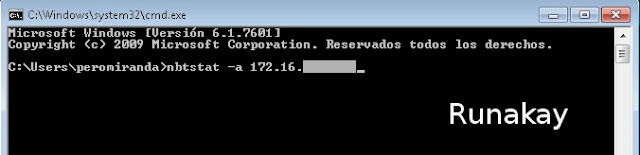
In this world all the computers that are connected to a network have to be identified in some way, hence, the IP (Internet Protocol) address exists and gives each computer a unique identification number by which we can find them. However, when you work with a computer that is in a local network it's always necessary to get connected to it, what is more, sometimes you need to access to it without being physically there. Thanks to god that we have a mechanism to see our machine remotely, and this requires obviously the IP address or the computer name. Yes, a computer name, because remember that the IP address is composed by many numbers that are not easy to remember, even more, sometimes the name of the machine gives you a clue about what kind of computer is, for example, where I work a name beginning with "PE" means that the computer is located at Peru meanwhile starting with "CO" means that it's in Colombia. Perhaps it happened that you only hav...

Making Excel VLOOKUP Function to Work

Image
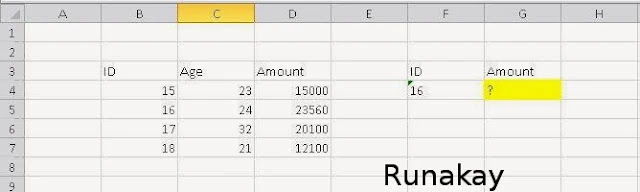
I have seen many times that there are some scenarios where the Excel VLOOKUP function is not able to calculate the value we are looking for. For example, let's search the amount for the ID 16 according to a little table with this value. This is something really easy to do, we need only to use VLOOKUP function selecting the ID, the matrix and the column to be search. However, when you see the result of this function you notice that there's an error despite the values are fine. The reason of this error is that the searched ID value is stored as text, so you can convert it in number in this case because it's only one value, but what if it were a thousand of them?. To avoid worrying about format issues just embraces the key value in the VALUE function inside the VLOOKUP function. Once you use the function you are going to get the value that corresponds to the ID. Consider that this is an example where the...

Changing Size of VirtualBox Disc

Image
Since I decided to use Linux , because I like it a lot, I knew that I'll need Windows anyway due to the fact that everyone (at most) uses it and considering also that my posts would have to be focused in this operating system (my readers use it). To overcome this situation I decided to install a virtual machine on my Linux ( Debian specifically) to avoid rebooting anytime I need to do something in Windows, to accomplish this purpose I installed VirtualBox and installed in it Windows 7. However, In some point there was need to get more disk space but I couldn't get it because when you define a virtual machine you specify a determined disk size. But, it can be done the following to increase the disk size using the tools provided by VirtualBox. First, increase the disk size by using a VirtualBox command created for this task. Remember that the virtual machine has to be turned off to be able to modify the virtual disk, once you are sure about this, go to the configu...

Creating Scripts To Insert Data From Existing Tables

Image
When we work with systems is inevitable to work with data that is manipulated by these, and there are moments when you need to move data created by one application to another database, but it's not necessary to copy all the database to another one, maybe you require just to move all data for particular tables. For this task, SQL Server can help us by using the "Generate Scripts..." option that it's into Management Studio tool, you only have to right-click over the source database and go to "Tasks" menu and here locate the option said before.     You will see the introduction, just click "Next". As I said at the beginning in this opportunity we are going to select a group of tables and not all the database. Specify the media where this result is going to be published. But, in this case it is necessary to click on "Advanced" option to personalized the operation. As we want just the data, select "Data only" i...

Using Calculated Fields in Dynamic Tables with Excel

Image
Honestly, I don't consider myself an expert in dynamic tables, although many people think that actually I am this is just because I know many tricks about Excel , however I don't use dynamic tables a lot and therefore there are things about this tables than I don't know. One day, when I was at work, a partner called me to watch his computer because he had a big doubt about something so he decided to ask me about it. He was managing a huge dynamic table that have a bigger simple table as data source, this dynamic table resumed all sales from region, but the problem was that he needed to show that resume not with the exact amount but rounded to thousands. At that moment I couldn't help him because I didn't know how to do it, but now I took a time for testing ways of doing that and I want to show you what could have done at that time. First at all create a simple table with few regions and sales value in 3 currencies.   With this information, select it a...

Attaching Files to Microsoft Word

Image
Probably you already know, but I work with systems, I mean, I analyze the client requirements and specify the features a new software or piece of it will have, to do so it's well know that exists an standard document where an analyst have to explain in detail how the feature will behave when the user interacts with it. Many times, it's necessary to make references to other documents to get the specification clearer enough, and this is why I thought about attaching files instead of referencing them because the person who this document was address for couldn't access to our repository, so I tried to send a unique file containing all the information to avoid any problem. As I did this through Word I'll show you how to do it in it, probably you can do the same with the other Office applications. The first thing you have to do is to prepare the file that is going to be attached, once you got this file you are now able to use it inside a parent file. The next step ...